
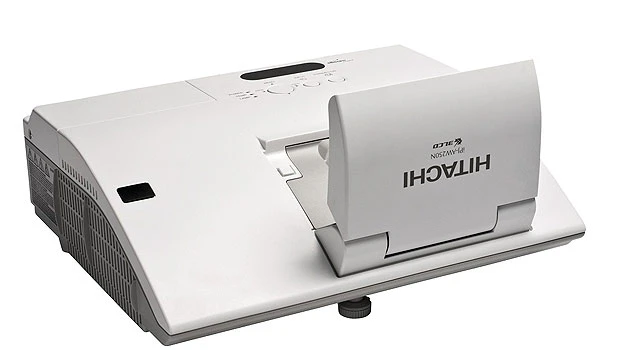
- • Projector and whiteboard in one<br/> • Share photos from your mobile<br/> • XOOM into this tablet<br/> • Sort out the insanity<br/>
The iPJ-AW250N is Hitachi’s first-ever interactive projector. It has all the functionality of a interactive whiteboard built into it, eliminating the need for additional hardware. This new projector turns any suitable wall or surface into an interactive display, without the expense or installation limitations of having to mount a separate interactive whiteboard. the iPJ-AW250N features an ultra-short-throw lens that enables it to be mounted close to a wall or projection surface. This prevents obstructed images and shadows, with no light shining in the presenter’s eyes. The user can write, draw, manipulate and resize projected images by using Hitachi’s pen-sized Interactive Control. The projector itself is operated by either touchscreen or through an included remote control. The iPJ-AW250N offers a simple menu system that provides ready access to all functions. The projector comes with a dynamic set of teaching and lesson-building tools for educators. Business users will find a wealth of graphics tools, templates, colors and resources for creating compelling presentations. Microsoft PowerPoint, Word, PDF, JPEG and other formats can be imported.
Photobucket is my favorite photo and video sharing service. The service just got better with the creation of the mobile app experience, Snapbucket, and unlimited photo storage for all users. There's also expanded video storage — 500 videos up to 10 minutes in length. Snapbucket enables users to “snap” photos from their mobile device, personalize those photos through unique filters, effects, vignettes and frames, and then easily share them with their social community. Snapbucket also allows users to create and save their own distinct sets of filter combinations. Best of all, both the original and personalized photos are automatically stored online in the user’s Photobucket account. Check out Snapbucket at www.photobucket.com/snapbucket. To create a free Photobucket account go to http://photobucket.com or find the Photobucket Mobile Application through the app stores of all major smartphone platforms.
Looking for a tablet computing device? Then consider the Motorola XOOM Wi-Fi. It's retailing from SR2,499 at Axiom Telecom. The XOOM runs on the Android 3.0 Honeycomb operating system. This tablet showcases the innovations of the Honeycomb user experience — including widgets, true multi-tasking, browsing, notifications and customization — on a 10.1-inch widescreen HD display. With a dual-core processor and 1 GB RAM, the XOOM delivers a fast web-browsing performance. The tablet offers the latest Google Mobile services including Google Maps 5.0 with 3D interaction and a user menu that is fully Arabized for the Middle Eastern consumer. The XOOM also supports Adobe Flash Player, enabling the delivery of Flash-based web content including videos, casual games and rich Internet applications. Axiom has also brought accessories such as a docking station for watching video content or listening to music through external speakers as the device charges. There's a nicer Speaker HD dock that can send HD content directly to a TV via HDMI or allow the user to listen to music through two built-in speakers — eliminating the need to attach external speakers. And if you're a content creator, don't forget the Bluetooth keyboard with its special Android shortcut keys.
Are you copied on five hundred e-mails each week? Do colleagues send you notifications long enough to rival “War & Peace?” Is a partner system spewing out invites to every event worldwide? If your inbox is about to burst, then download Xerox's free desktop application that lifts the curtain on your email and your brain. The Business of Your Brain desktop app analyzes emails and calendar notices to identify those distractions that steer focus away from your real business. Then you can send tactful notes to your inbox abusers to encourage them to let you get back to work. Available for download at http://www.BusinessofYourBrain.com, the MS Windows desktop app securely synthesizes data from a user’s Microsoft Outlook account. Through interactive visuals, it outlines by day, week and month the activities, people, events and vocabulary that fill a user’s inbox.