
- Most parents are unaware that the American Academy of Pediatrics (AAP) recommends that children over the age of two limit time with screen media — television, computers, video games — to less than two hours daily.
AAP noted linkages between long hours spent with some types of digital media and a plethora of physical, academic and behavioral problems. AAP recommends that infants and toddlers under the age of two not be exposed to screen media at all. That leaves parents in a quandary. How can parents find things for digitally inclined youngsters to do which stimulate creativity?
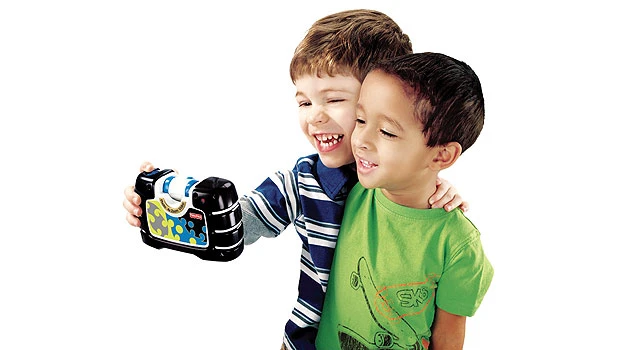
First, let's take a look at the "See Yourself Camera," which is part of Fisher-Price's Kid-Tough durable electronics products. Designed for young photographers, with this camera kids can take digital photos as well as shoot video. The camera is equipped with a 180-degree swiveling lens that allows children to take pictures of themselves, their family or anything in their world. The camera is very intuitive to use, with big buttons and kid friendly controls.
Once kids master the basics of composing a picture they can move on to adding special effects to their images, and then upload the pictures to a computer with a USB cable so the photos may be edited, printed or emailed. Downloadable photo editing software — for PC only — lets kids be even more creative with their pictures, offering more effect options and the ability to make books and cards.
The See Yourself Camera has a 1.8-inch color screen, a wrist strap, 4x digital zoom, an SD card slot, and low-light performance, so there is no need for a flash. The camera stores 1,300 digital images, but you can expand its memory by adding an SD card, which is sold separately. Offered in two style
versions — black, blue, and green or purple and pink — the camera operates on four AA batteries. It retails for about $70 — without the USB cable, batteries and SD card.
But not all pictures need to come from the real world. Kids have incredible imaginations and earlier this year Griffin Technology began introducing Crayola branded products to enable children to reveal their artistic talents. About the only thing missing from this digital play experience is the delightful waxy scent of a new box of crayons. Griffin Technology's first offering was the Crayola ColorStudio HD, which uses a drawing application for iPad with a custom-built digital stylus, called the Crayola iMarker. Crayola ColorStudio HD allows young artists to color and interact with special “live” animated coloring book pages that move and react as they color, combining custom-produced pictures, animations, music, and special effects.
Now, the company has just launched two new products — the Crayola Trace & Draw for iPad 2 and the Crayola Paint & Create app. Designed for use with the free Trace & Draw app, the Crayola Trace & Draw is both an iPad 2 protective case and art station in one. Trace & Draw gives young artists more than 35 different characters to trace and these may be combined with fun animations and activities that provide hours of creative play.
The Crayola Paint & Create app is an evolution of the ColorStudio HD and it makes available games, puzzles, mazes, color-by-numbers, dot-to-dots and more. With Crayola Paint & Create a child's fingers become colored pencils, paint brushes, crayons or markers. A finger's touch or swipe brings coloring pages to life, with motion and sound effects that add to the fun. Kids can color in animated pages, or generate their own works of art from a blank canvas. All artwork can be saved to a gallery, emailed, uploaded to Facebook or printed out.
Not every parent is comfortable though sharing an expensive iPad with their children. That's where the LeapPad Explorer becomes attractive. Designed to look and work like a tablet device, the LeapPad Explorer offers kids age- appropriate educational activities. The LeapPad Explorer features a built-in camera/video recorder, a built-in microphone and a library of more than 100 learning game cartridges, books, apps and videos. The Explorer is controlled by finger, stylus or the device can be turned, twisted or even shaken for motion- based play. This is a ruggedized educational tool. Content includes phonics, mathematics, spelling, geography, world languages, music, science and life skills. Kids can practice their writing skills using the stylus with step-by-step guidance. LeapPad's Animation Studio uses Disney characters in its examples and with Story Studio, children develop their own storybooks, personalizing artwork and recording their own narration with the built-in microphone. The LeapPad Explorer retails for $100 with apps sold for $7.50 and cartridges for $25.
The last item to share with Arab News readers today is a great new book which aims to educate young children on Internet safety. "The Mouse Who Went Surfing Alone," is a colorful, child-friendly book complete with stickers. Parents can read the book with their children to discuss the dangers lurking online when youngsters use the Internet without parental supervision. The book tells the story of Wesley, a young mouse who loved to surf. Despite his parents’ warnings, he went surfing alone and encountered numerous predators such as a barracuda and a shark disguised as a dolphin. With quick thinking and common sense, Wesley avoided dangers and returned home safely. Wesley’s adventure surfing on the high seas serves as a metaphor to surfing on the Internet, educating young children about safe browsing habits and providing parents with an age appropriate platform to discuss online safety. The book retails for $12.95 at Amazon.com, with all proceeds benefiting an NGO that works to ease the criminal justice process for abused children.