
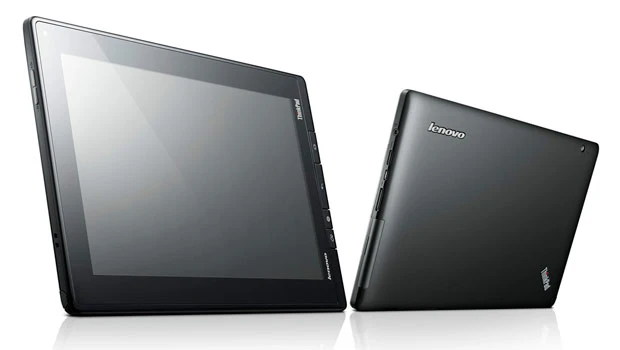
- THE Lenovo ThinkPad tablet became available locally last month.
- This device was introduced in Fall 2011 and has taken a while to reach the Saudi market.
The ThinkPad tablet targets the enterprise sector, particularly in environments where mobility is desired, and security and manageability are essential.
Lenovo sent over the ThinkPad tablet for a trial and it was exciting to pull the device out of the box and find that it really appears to be a tablet for “those who do.” The tablet is clad in a satin black case, so no fingerprints there, with a 16:10 IPS screen covered in Gorilla Glass. It's a little thick but that's because the device is designed to pass eight rugged military specifications. This is the only Android tablet to offer complete protection against nonwarrantied operational or structural damage due to drops, minor spills, electrical surges and other accidental damage incurred under normal operating conditions. If it falls off the desk, gets stepped on by accident, or a cup of coffee gets dumped on it — no problem.
In terms of performance, the ThinkPad tablet is powered by an NVIDIA Tegra 2 Dual-Core 1GHz processor. It offers strong security features including full device and SD card encryption, lost device disablement and anti-theft software. This is a multi-touch tablet with a digitizer pen input (stylus) that operates for up to eight hours on WiFi; 3G is optional. Front and back mounted webcams enable video conferencing. There are also HDMI output, native USB 2.0 and micro USB ports.
From a hardware point of view, the Lenovo ThinkPad tablet is great for the office. But turn it on, try to use it and reality bites. The tablet is running Android 3.1 and the operating system is inadequate. It was frustrating being forced to enter information with either the soft keyboard or digitizer pen. The voice functionality was awful, which crippled the device. It was time to telephone Lenovo and ask for an explanation.
“We are aware of the issues with voice functionality,” said Deshan Govender, product manager, Notebooks, Lenovo Middle East & Africa. “When the product was brought out last year, Honeycomb, which is Android 3.0, was the latest Android operating system that was commercially available. Voice features are enhanced in Android 4.0 and we have a plan to upgrade the operating system.”
Lenovo is currently doing beta testing with a few selected customers who have purchased the ThinkPad tablet. That testing should be finished by the end of April and then a launch schedule will be put in place for the Android 4.0, Ice Cream Sandwich (ICS) update, most likely in early May. Govender explained that because the ThinkPad tablet is being used by enterprise customers, it's essential to be sure that when the upgrade is done everything works and that a better end user experience is created.
According to Lenovo, the OS upgrade will result in a new and improved browser with a significant speed enhancement that allows users to jump to their favorite content faster and even save it for reading later in case there's no network available. Functional voice input will allow users to dictate text. As the voice input engine enters text, it will underline possible dictation errors in gray. After dictating, users tap the underlined words to quickly replace them from a list of suggestions. A new security option will be available in “Face Unlock,” which uses a user's face to unlock the tablet. This feature takes advantage of the device’s front-facing camera and facial recognition technology to register a face during setup and then recognize it again when unlocking the tablet.
Govender commented that the design team behind the ThinkPad tablet went with Android because when the project was initiated, Microsoft Windows was inadequate for use in a tablet device. Additionally, IDC was reporting that 40 percent of the market would be Android by the year 2014, so there was a business case to be made for choosing Android over Windows.
“IDC is now forecasting that Android will be 40 percent of the market by 2015. That's a year behind the previous mark, but still shows that there is a very strong market for Android,” said Govender. “We will also launch a Microsoft Windows tablet with Intel when Windows 8 launches. If you talk to other vendors about the tablets they're running on Microsoft Windows, they are all promising great functionality when Windows 8 is released.”
Govender believes that Lenovo needs to do more to reach out to enterprise customers, rather than just expecting that the ThinkPad tablets will just sell themselves. Android is popular with consumers but business users are still unfamiliar with it, particularly in terms of how it functions with typical business applications. For instance, the app “Documents to Go” enables users to view, edit and create Microsoft Office files. There are loads of other enterprise suited apps such as Good for Enterprise, Cisco AnyConnect and Computrace Mobile and the ThinkPad tablet comes with 25 apps pre-loaded.
“Customers who have purchased the ThinkPad tablet are people who generally have another PC and this is more of a companion device that they take on their travels,” advised Govender. “They use the device to check their emails on the run and edit documents, but really not to do intensive content creation or graphics that would need a high performance desktop or notebook to do. That being said, when Microsoft Windows 8 launches and Intel's next generation processors are launched by the end of the year, we're looking at a different argument in terms of a tablet device. With the performance you're going to be able to get and the operating system, we may be looking at replacing your existing desktop and notebook.”