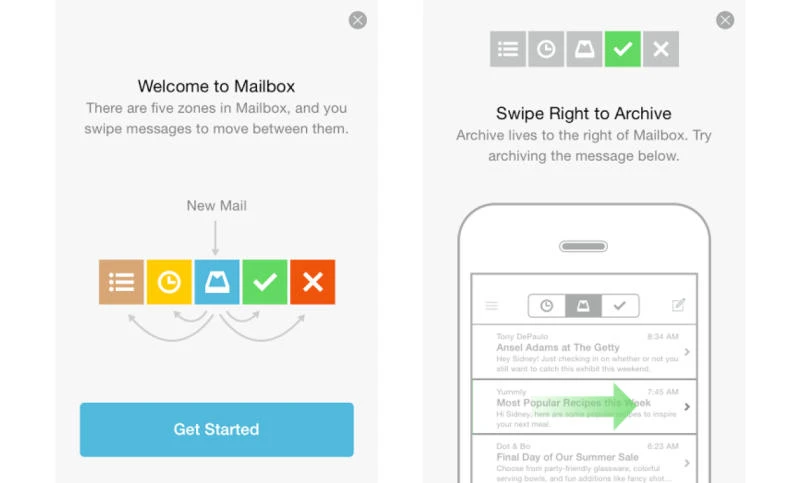
Tired of opening multiple browsers to check your email accounts? Prepare to get wowed by this new app: Mailbox.
Add multiple email accounts to one place to take back control over your mail life with Mailbox for iPhone and iPad, Android or Mac OS and send and receive emails directly from Mailbox app. You can even attach files stored on your Dropbox if you sign in using your Dropbox account. As a plus, Mailbox will sync across all your devices when using Dropbox.
Mailbox features that stood out for me as someone who has a love-hate relationship with inbox:
Lists: Mailbox lets you create lists of things you want to buy, read, watch or anything else that comes to your mind. Just long swipe left on any item to any of them list.
Later: This option is really great; snooze an email just like you snooze your alarm clock for 10 minutes every morning by swiping to the left and it will disappear from your inbox to return only at the time you choose. Simply tap on any icon to make this particular email message return later today, this evening, tomorrow, this weekend, next week, in a month, someday (this one has a rainy cloud icon!) or pick a date of your choice.
Until the message returns, you can find it in the Later zone in Mailbox or in a folder called “Later” inside the Mailbox folder.
“Help me get to zero”: When you click on the “Help me get to zero”, which appear on top of your inbox you will get help from Mailbox to unclutter your inbox by removing unnecessary messages:
Archive all your messages, all of messages except unread or archive all except starred. Archiving messages that are unimportant will help you focus your attention on important ones.
Mailbox app is great compared to your typical Mail app. I have been using Gmail on my iPhone for a couple of years now but after discovering Mailbox I think I may be ready to move.
Are you using any mail apps on your mobile? What is your favorite?
Take back your inbox with Mailbox